
Hello world, my name is Francisco, fcoterroba on the Internet and today I’m bringing you, as every week, a new post in which, on this occasion, I’m going to comment on what the acronym RAID means in computing, what it can be useful for and the configuration of them for implementation.
Small note before starting, I recommend you visit the post I uploaded a few weeks ago in which I explain some of the most currently used computing and technological terms, including this one. As well as a couple of PDFs with a more detailed explanation. Visit me!
What does RAID mean?
RAID, apart from being a famous mosquito repellent brand 🦟, is a computing term that is an acronym. Redundant Array of Independent Disks.
Which, translated into Spanish, would be something like “Redundant array of independent disks”.
According to Wikipedia, RAID refers to a data storage system that uses multiple units (hard drives or SSDs), among which data is distributed or replicated. Depending on its configuration (which is usually called level), the benefits of a RAID compared to a single disk are one or several of the following: greater integrity, fault tolerance, transfer rate and capacity. In its original implementations, its key advantage was the ability to combine several low-cost devices and older technology into a set that offered greater capacity, reliability, speed or a combination of these than a single state-of-the-art device and higher cost.
Let’s see, now, without Wikipedia:
A RAID is a technological term that refers to a type of data storage system, a “way” of storing information on our computer.
RAIDs use 2 or more hard drives (HDD or SSD) among which data is replicated or distributed to strengthen their security or fast access. The definitive purpose of the RAID will be marked according to the level we are going to configure.
What are levels?
Actually, since there isn’t a single way to create a RAID, these are divided into numerically numbered levels.
There are an infinity of RAID levels both standard (RAID 0, RAID 1, RAID 2, …, RAID 6E), nested RAIDs, which are mixing two previous standards (RAID 0+1, RAID 1+0, RAID 30, etc.) and even proprietary RAIDs (Linux MD RAID 10, IBM ServeRAID 1E, etc.). Although in this post, I’ll only talk about the three main RAID levels, with which I’ve worked the most professionally, academically and with the most common frequency of use.
RAID 0
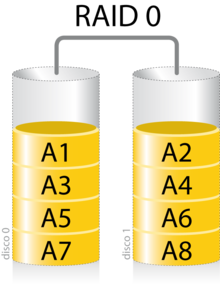
RAID 0 (usually called striped set, striped volume, striped volume) is the most basic RAID existing today. You only need two hard drives.
It really shouldn’t be considered a RAID level since it’s not redundant.
It’s usually used mainly to increase write performance since the write rate is performed in parallel between the two disks. Its operation, as can be seen in the image, is to write each part of a program or file, in parts between one and the other disk.
The size of this RAID set will be x² where x is the smaller capacity disk. For example, if we want to create a RAID 0 with a 250GB disk and another 500GB, the resulting set will be 500GB, thus losing a third of the total.
RAID 1
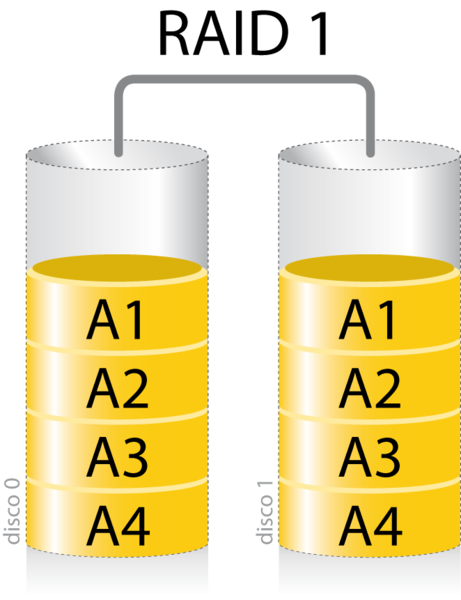
RAID 1 (also called mirror) requires 2 or more hard drives to be performed.
As can be seen in the image, the main operation of this Array is to create an exact copy (hence the mirror) of a data set on two or more disks.
This disk system is made when what is sought is an extra in security since, if we lost one of the disks, we would still have the other perfectly functional, leaving room simply to replace the damaged disk with a new one.
As you can imagine, this system doesn’t improve write speed, but it doesn’t make it slower either, since each disk works independently in this aspect.
The memory size of this disk set will be equal to the maximum size of the smallest disk existing in the array.
If we repeat the previous example, this RAID 1 will have a capacity of 250GB.
RAID 5
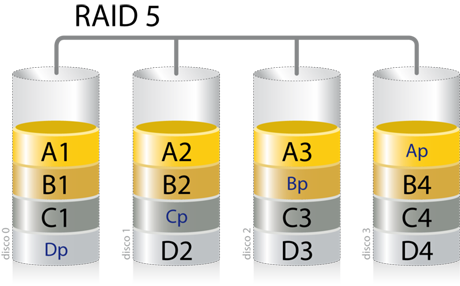
And, finally, I’m going to explain RAID 5 (also called distributed with parity).
In this RAID, as you can see in the image, we’re going to need a minimum of 3 hard drives to perform it.
The operation of this RAID could be summarized in a strange mixture of the two RAIDs explained above. It uses RAID 0, by writing each part of the information block among its different disks and then, it uses the idea of RAID 1, replicating that information on the last disk, after writing it, although it’s not exactly like that.
What the array does here is to reflect the division of data at the block level that are distributed respectively using parity among all available disks. (We’ll talk about parity next)
Only, so far, you should know that parity blocks are not read in read operations since these blocks are, in major words, a way to recover data if a disk atrophies. If a second one failed, this would cause complete data loss.
RAID 5 suffers when subjected to many small write workloads since the parity block must be updated in each write operation.
As a curiosity, many people and manufacturers that make RAID systems, regardless of level, make them using disks from different batches to increase their reliability and reduce the probability of failure.
What is parity?
Parity is nothing more than a method to provide error tolerance in a data set, thus being able to recover information. Speaking badly, parity is a way of storing information, being able to restore it later as long as two or more disks haven’t been lost.
Parity calculation can be easily performed by looking at Boolean algebra rules. We’ll specifically use an operation called “exclusive or”. Which means “either one or the other, but not both.”

The calculation has been performed as follows: If 1 or 0 is in both disks, parity will be 0. Otherwise, it will be 1.
10101101 XOR 10000111 = 00101010
How are RAIDs performed?
The way to perform RAID can be in two different ways:
- Hardware
To perform a RAID system through hardware it will be necessary to buy a card especially for it. This one I recommend on Amazon doesn’t exceed 35€, allows you to perform up to RAID 10 being able to connect up to 4 SATA hard drives with a theoretical transfer speed of 3.0Gb/s
- Software
You can create RAID systems with the disks you already have normally installed on your computer or server, without needing to buy a specific card for it.
I leave you this video where it’s explained quite clearly how to make a RAID 0 using Windows 10:
And this other video, to do exactly the same, using Linux (Ubuntu, specifically):
And that’s all for today guys, I hope you liked this type of posts, a bit more computing but without losing the essence that anyone, without having knowledge, can do it. 😉
Don’t forget to follow me on Twitter, Facebook, Instagram, LinkedIn and see you next week!
